You open a habit tracker after being away for a few days. Maybe it was a rough week, maybe you just forgot, maybe life happened. And the first thing you see is a row of empty checkboxes and a broken streak counter staring back at you. Somehow the app that was supposed to help you feel on top of things is now making you feel worse about yourself.
This happens to a lot of people, and it is not a personal failure. It is a design problem.
Habit trackers are built around a very specific assumption: that the things you want to track happen on a predictable, recurring schedule. Every day, every week, every other Tuesday. The whole system, the streaks, the check-ins, the consistency graphs, only works if that assumption is true. And for a lot of things in your life, it simply is not.
Habit trackers were built for building new behaviors, not for tracking everything in your life
The streak mechanic in habit trackers is not accidental. It is borrowed directly from behavioral psychology, specifically the concept of operant conditioning. Streaks create a sunk-cost feeling that motivates you to keep going because you do not want to lose what you have built. Apps like Duolingo turned this into a science.
For building a new behavior, like learning a language or going to the gym, this works reasonably well. The daily friction and the fear of breaking a streak can carry you through the early phase where motivation alone would not. The structure is the point.
But that same structure becomes a liability the moment you try to use it for something that does not fit a daily or weekly rhythm. The app has no concept of "this thing only needs attention when it needs attention." It just keeps marking boxes empty and advancing the streak counter to zero.
The question habit trackers cannot answer
Think about the things in your life that truly matter but have no fixed schedule. When did you last clean the bathroom? When did your pet last eat? When did you last water that plant by the window? When did you last take that medication that you only need occasionally?
None of these belong in a habit tracker in any meaningful way. You can create a habit for "clean bathroom every two weeks" but what happens when you did it early? Or late? The schedule is now out of sync with reality and the app has no way to know. It just keeps firing reminders based on a calendar that no longer reflects what actually happened.
What you actually need to know is not "did I do this today?" That question is completely wrong for this category of things. The right question is something different entirely.
What state is this in right now, and how long has it been that way?
Those are two entirely different questions, and they require a different kind of tool.
Your brain is carrying more than it should
There is a concept in cognitive science called cognitive offloading. It refers to the practice of using external tools, like notes, calendars, or checklists, to reduce the mental burden of remembering things. Research consistently shows that when we trust an external system to hold information, the brain actually relaxes its grip on that information. This is a feature, not a bug. It frees up working memory for more complex thinking.
The problem is that cognitive offloading only works when you actually trust the external system. If your habit tracker is out of sync with reality, your brain knows it. You stop trusting the app and you go back to holding everything in your head again. The cognitive load returns, plus you now have the added guilt of a neglected app.
Time blindness, which is particularly common in people with ADHD, makes this even more pronounced. When your internal sense of time is unreliable, you cannot estimate how long ago something happened without a concrete external record. "I think I watered it recently" is not the same as "I watered it four days ago." One is a guess and the other is a fact. When you are relying on guesses, the cognitive load never really goes away.
A system that simply records when something last happened and what state it is currently in solves this in a way that neither habit trackers nor reminder apps can. It does not ask anything of you on a schedule. It just holds the truth and shows it to you when you need it.
What most people try before downloading anything
Before reaching for an app, most people try the obvious solutions. They are worth taking seriously because they actually work in some situations.
A notebook or paper log is the most straightforward approach. You write down what you did and when. There is no setup friction, no notifications, and no dependency on a phone. For people who already have a journaling or note-taking habit, adding a few "last done" entries to that system can work surprisingly well. The limitation is retrieval. When you want to know when you last did something, you have to flip back through pages and find the entry. If you track more than a handful of things, this gets tedious quickly.
The notes app on your phone is the digital version of the same idea. A running list of entries like "last watered plants: March 14." It is fast to update and easy to search, but it still requires you to manually hunt for the entry every time you want to check something. There is no way to see everything at once without scrolling.
Some people use calendar apps creatively, logging completed tasks as past events to create a history. This works but calendars are designed for scheduling, not retrospective logging, so you are fighting the tool's natural design every time you use it this way.
Spreadsheets are another option, and for highly organized people they can be powerful. A simple table with item names, last-done dates, and current states can work well. The downside is the friction of opening and updating a spreadsheet every time you do something small. Most people who try this approach find that they update it consistently for a week or two and then stop.
All of these approaches share the same fundamental limitation: they are static records that require manual updates and active effort to consult. They have no awareness of time passing. A notebook does not know that four days have gone by since you wrote that entry. It will not nudge you or change color or tell you that this thing has been sitting in this state longer than usual.
When the manual approach starts breaking down
The traditional approaches are perfectly reasonable for tracking a small number of things that you check infrequently. If you just want to remember when you last changed your car oil, a single note in your phone is probably enough.
But when the number of things grows, when you want to track them across different categories like home, pets, health, and errands, and when you want to know the current state of each thing immediately without digging through a notebook or searching a notes app, the manual approaches start breaking down. The maintenance cost of keeping them accurate becomes a chore in itself.
This is the point where a purpose-built tool starts to make real sense. Not because apps are inherently better, but because the specific problem of tracking many things with different states and no fixed schedules is exactly the kind of problem that benefits from structure and a little automation.
What tracking the last time actually looks like
A last time tracker flips the model entirely. Instead of asking "did you do this today?" you log the action you just did, and the timer starts from that moment. The question it answers is not about your consistency or your habits. It is about what you actually did and how long ago you did it.
Most existing last time tracker apps work by letting you tap a button to log something manually. You watered the plant, you create new entry. You fed the dog, you create a new entry. That part works well for one-off things you want to remember. But for things that repeat, things you are going to do again and again over weeks and months, a plain log starts to feel like maintenance. Every entry is a manual action. There is no state, no context, no way to know immediately whether the thing still needs attention or was already handled.
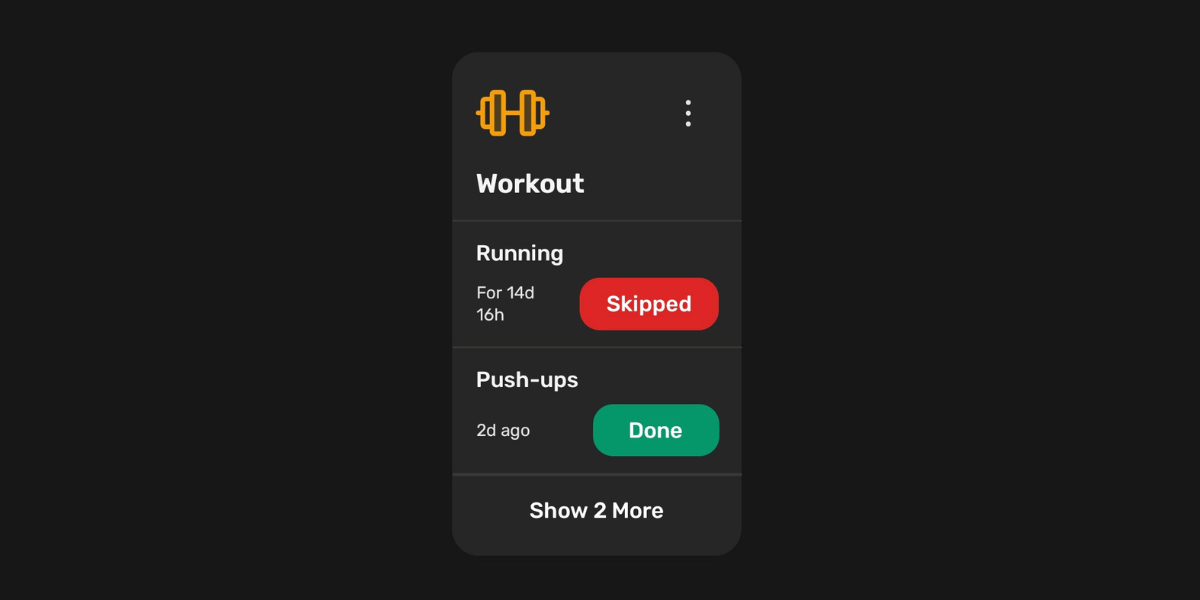
The better approach is to track actions as states. A plant does not just get watered into a void. You water it, and it enters a Watered state. After a few days that state expires and it moves to Pending, or Skipped if you missed it. A medication does not just get logged. You take it, and it becomes Taken. You forget, and it becomes Missed. The state tells you the full story of what happened and what needs to happen next, not just a timestamped list of past events.
This also means the app can do the thinking for you. If something has been in a particular state long enough, it can switch automatically to the next state without you having to remember to update it. That is where it stops being a passive log and starts being a system that actually works on your behalf.
There is an app built specifically for this
DoneAgo is an Android app built around exactly this idea. It was not designed to replace your habit tracker or your reminder app. It was designed for the category of things those tools cannot handle, which is anything that has a state, changes at irregular intervals, and matters to know.
You create an item, like your cat or your car or your medication. Inside it, you add trackers like Feeding or Oil Change. Each tracker gets its own set of states that you define: Fed and Hungry, Fresh and Due, Taken and Missed. Tap a state pill and the timer starts. From that point the app always knows what state something is in and how long it has been there.
Auto-advance is one of the features that makes a real difference for things you do repeatedly. You set a time threshold on any state, and when enough time passes, DoneAgo automatically moves the tracker to the next state without you having to touch it. Water your plant and mark it as Watered. Set it to auto-advance to Pending after three days. The app handles the transition on its own. You only need to act when it actually matters, not to keep a log updated.
Notifications in DoneAgo also work differently from the usual reminder apps. You are not setting a recurring alarm on a fixed schedule. You are setting a threshold on a state. When a tracker stays in that state longer than you specified, DoneAgo lets you know. No noise when things are fine. A quiet nudge only when something has been sitting long enough to warrant your attention.
Home screen widgets let you see the current state and time elapsed for your most important items without opening the app at all. You can also tap a state pill directly on the widget to update it instantly. For things you check often, this alone removes most of the friction.
It is free to download. The premium version unlocks enhanced features including unlimited items, unlimited widgets, and auto-switch states. You can get it as a one-time lifetime purchase or a yearly subscription, whichever works better for you.
If you have been looking for something that tracks when you last did things without making you feel bad about the things you have not done today, this is the app that was built for that.
Try DoneAgo on Android
No streaks, no schedules, and no guilt. This is just a personal dashboard of what is actually happening in your life.
Download on Google Play